

Key AI Use Cases for Amazon Kuiper
Identified through collaborative workshops, these use cases represent the highest-impact opportunities for AI adoption across your team
Marketing
- Generate creative assets (images & videos)
- Localize creative assets
- QC marketing materials against brand standards
- Generate SEO-optimized copy
- Mine customer testimonials and develop success stories
- Track, tag, and traffic marketing campaigns automatically
Insights & Analytics
- Monitor competitive intelligence and market positioning
- Track country-level pricing changes and competitor offerings
- Compare year-over-year forecast data across sources
- Generate reports and extract insights from analytics databases
- Research market trends and business intelligence
- Model scenarios for business-specific challenges using live data
Go-to-Market (GTM)
- Ingest customer insights and GTM documentation to summarize key insights
- Build propensity models using internal customer data
- Model customer personas to understand segment behaviors and needs
Operations
- Accelerate legal approvals by searching knowledge bases for substantiation
- Optimize organizational structure and team design
Customer Experience
- Create synthetic customer and executive personas to test messaging and content
- Analyze customer service calls to identify and remediate common issues
Brand & Documentation
- Generate and iterate on strategy documents (with persona integration)
- Generate naming options for products and services based on brand rules
- Edit and validate brand voice across touchpoints
Starred items indicate highest-priority use cases
These represent the most impactful opportunities identified during our workshop sessions
Use Case Prioritization Framework
Each use case has been evaluated across two critical dimensions: technical complexity and business value to Kuiper. This framework helps identify quick wins (Quadrant 1) and strategic investments (Quadrant 3).
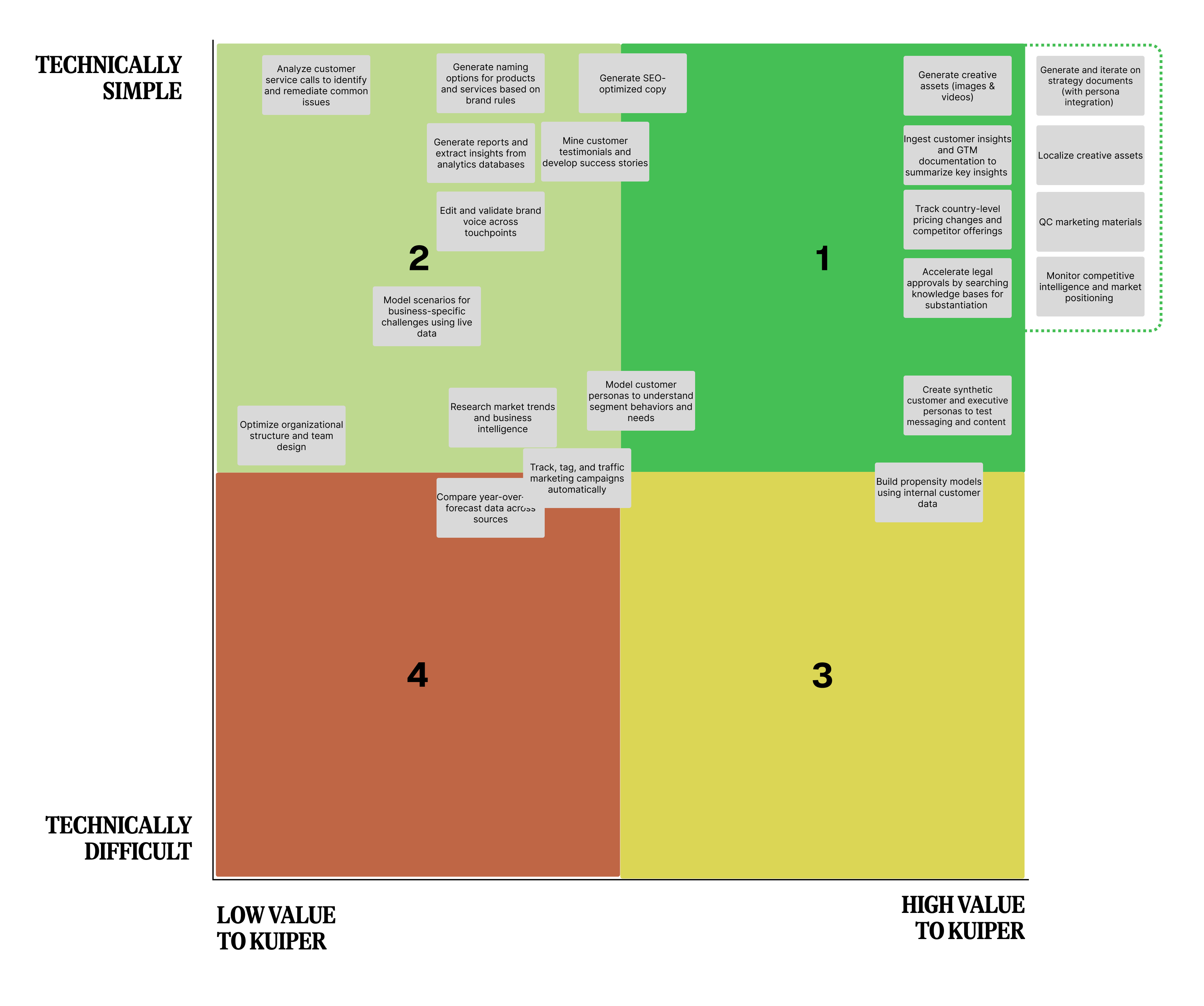
Quick Wins
High Value + Technically Simple
These use cases deliver immediate impact with minimal technical complexity. Priority for rapid implementation and ROI.
Fill-Ins
Low Value + Technically Simple
Easy to implement but lower strategic value. Consider for resource availability or learning opportunities.
Strategic Investments
High Value + Technically Difficult
High-impact opportunities requiring significant technical effort. Plan for phased rollout with dedicated resources.
Avoid
Low Value + Technically Difficult
Poor ROI profile. Deprioritize unless specific circumstances change the value equation.
How We Define Value and Complexity
→ High Value to Kuiper
- • Direct revenue impact or cost savings
- • Significant time efficiency gains across teams
- • Competitive differentiation in market
- • Scales across multiple departments
- • Addresses critical pain points
→ Technically Simple
- • Leverages existing AI tools (Cedric, Amazon Q)
- • Minimal custom development required
- • Standard API integrations
- • Low data preparation complexity
- • Fast proof-of-concept possible
2026 AI Implementation Roadmap
Building Quadrant 1 (Quick Wins) use cases using agile 2-week sprints. Each use case requires 3 sprints (6 weeks) to build, test, and deploy. Target: 2 use cases per quarter, 8 total for 2026.
Q1 2026
Jan-MarMonitor competitive intelligence
Insights & Analytics
Weeks 1-6
Localize creative assets
Marketing
Weeks 7-12
Q2 2026
Apr-JunQC marketing materials against brand standards
Marketing
Weeks 1-6
Accelerate legal approvals via knowledge bases
Operations
Weeks 7-12
Q3 2026
Jul-SepTrack country-level pricing changes
Insights & Analytics
Weeks 1-6
Ingest customer insights & GTM docs
Go-to-Market
Weeks 7-12
Q4 2026
Oct-DecBuild propensity models using customer data
Go-to-Market
Weeks 1-6
Generate creative assets (images & videos)
Marketing
Weeks 7-12
Sprint Methodology
Sprint 1-2: Build
Prototype development, core functionality, initial testing
Sprint 3-4: Test & Refine
User testing, feedback integration, quality assurance
Sprint 5-6: Deploy & Scale
Production deployment, team training, measure success
Understanding Team Focus Areas
The majority of the Amazon Kuiper team currently works on External/Forward-looking activities since the product hasn't launched yet. This context influenced which use cases were prioritized during our workshops.
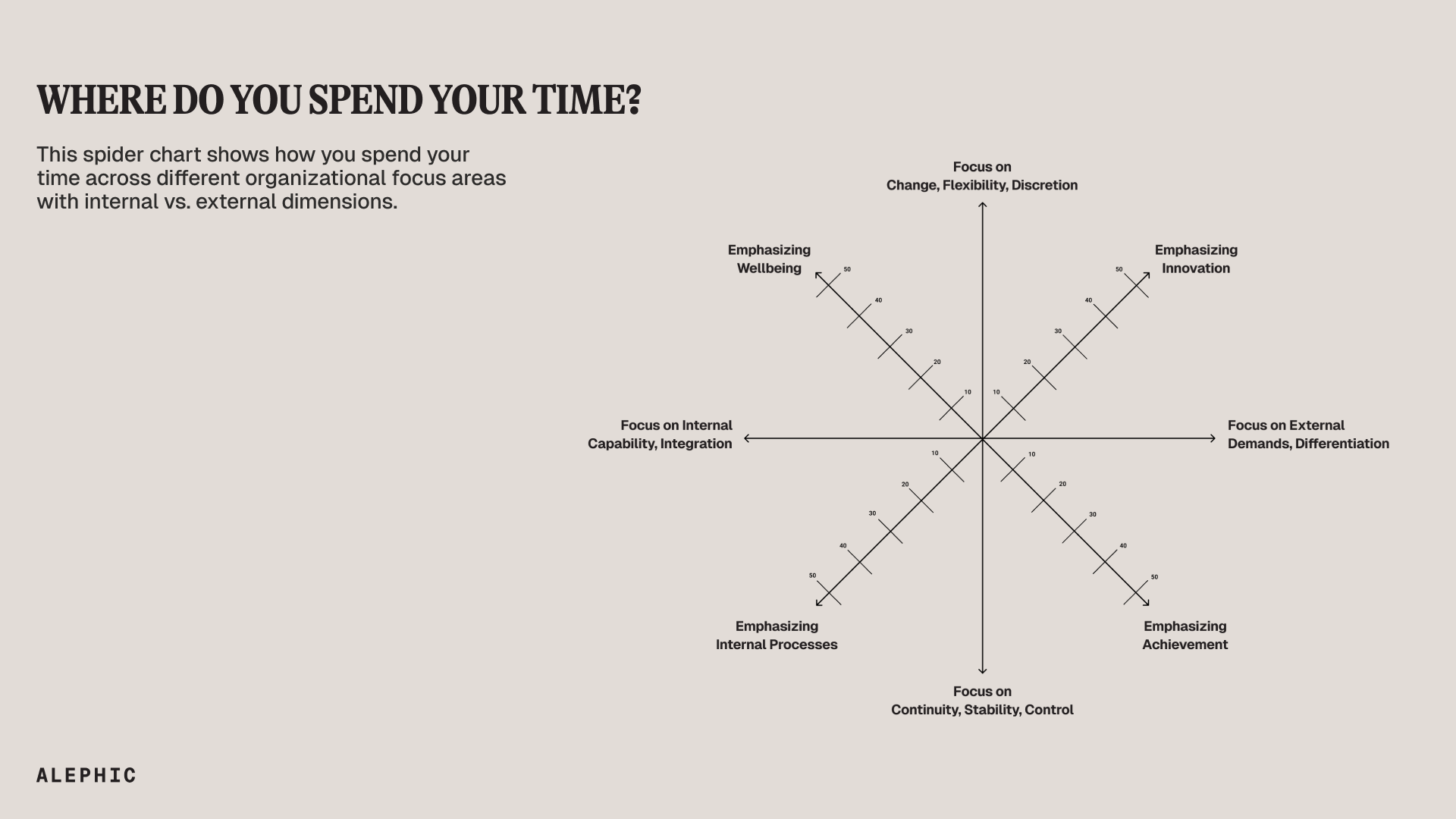
◆ Internal / Backward-looking
Performance reviews, budget reconciliation, postmortems.
Can become overly retrospective and bog down progress.
◆ Internal / Forward-looking
Strategic planning, org design, capability building.
Often the highest-leverage quadrant for scaling a business.
◆ External / Backward-looking
Client QBRs (Quarterly Business Reviews), investor reporting, customer satisfaction reviews.
Important for accountability and learning from customer feedback.
◆ External / Forward-looking
Business development, sales strategy, product roadmaps with customers, investor pitches.
Focused on growth & positioning. Primary focus for pre-launch teams.
Key Insight: Since Amazon Kuiper is in pre-launch mode, the team's time is heavily weighted toward External/Forward-looking activities like business development, sales strategy, and product roadmaps. This explains why use cases focused on competitive intelligence, GTM strategy, and customer persona modeling received high priority.
Amazon Kuiper AI Survey Analysis
Understanding AI adoption, identifying opportunities, and unlocking productivity for the Amazon Kuiper team
Analysis of 34 Amazon Kuiper team members reveals strong AI adoption with 44% daily usage and 6.5/10 average comfort level. Key barriers include Amazon's limited toolstack, security concerns, and prompting expertise gaps.
Survey Response Distribution by Quadrant
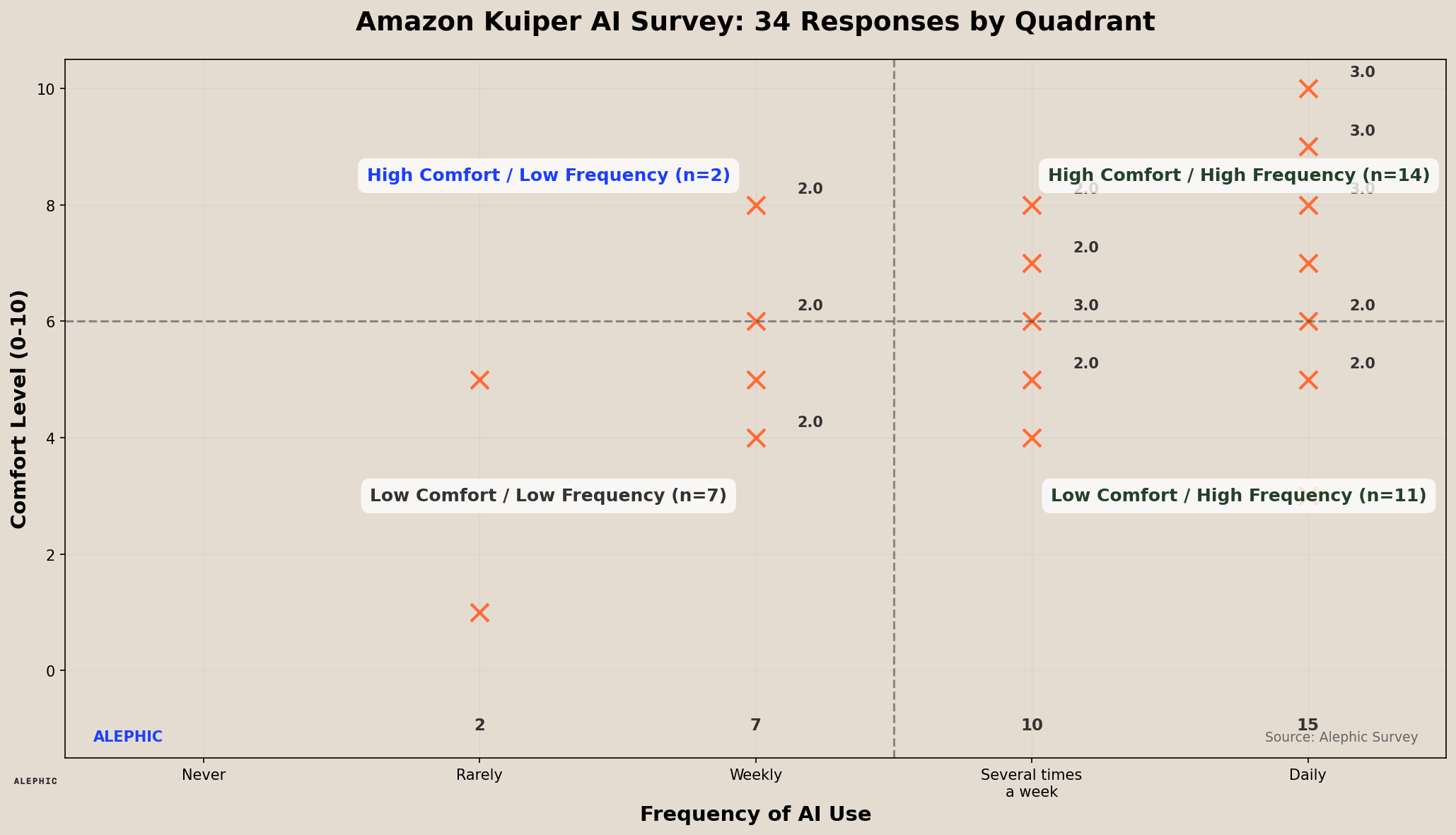
Survey responses plotted by usage frequency (x-axis) and comfort level (y-axis). Clear correlation visible between daily usage and higher comfort levels.
Survey Insights & Data Visualizations
Usage Frequency
Bimodal Adoption Pattern Reveals Opportunity
The 44% daily usage rate indicates a strong core of AI advocates within Kuiper, while the 29% 'several times a week' group represents engaged experimenters. However, the 27% using AI weekly or rarely shows untapped potential. This bimodal distribution is typical of early technology adoption curves and suggests the team is past the 'innovator' phase but hasn't reached mainstream adoption. The gap between daily users and occasional users presents a clear opportunity: converting weekly users to daily users could double the team's AI-enabled productivity within months.
Comfort Level Distribution
Mid-Range Comfort Dominates, Indicating Readiness for Advanced Training
The concentration of users in the 5-8 comfort range (68% of respondents) is remarkably positive - it means most of the team has moved beyond basic awareness and is ready for intermediate-to-advanced training. The 6.5/10 average is higher than typical enterprise baselines (usually 4-5/10), suggesting Kuiper has built a culture of experimentation. Notably, only one user rated themselves at 1/10, indicating minimal resistance. The bell curve centering around 6 suggests that with targeted upskilling, the team could shift this entire distribution 2-3 points higher within a quarter.
AI Tools Usage
Amazon's Internal Ecosystem Dominates, But External Tools Fill Critical Gaps
Cedric's 30-user adoption (88% of respondents) is exceptional and demonstrates strong internal tool advocacy. However, the 21 ChatGPT users and 13 PartyRock users reveal an important pattern: teams are creating 'tool stacks' rather than relying on single solutions. The continued use of external tools like Claude (7), FireFly (6), and MidJourney (4) despite security concerns indicates these tools provide capabilities that Amazon's internal ecosystem doesn't yet match. This presents both a risk (data leakage) and an opportunity (feature gap identification). The diversity of tools also suggests users are self-educating, discovering use cases organically rather than through formal training.
Top Challenges
Systemic Barriers Outweigh Individual Skill Gaps
Integration challenges (44%) and compliance concerns (38%) are organizational-level blockers, while skills gaps (35%) represent individual-level needs. This distribution is crucial: it means that even perfectly trained users will hit productivity ceilings without addressing system integration and policy clarity. The relatively low data quality concerns (18%) suggest the team is sophisticated enough to work around data limitations. The fact that skills gaps rank third (not first) indicates the team is resourceful and self-directed. Priority should be: 1) Clear compliance guidelines, 2) Better tool integration, 3) Formalized training. Addressing these in order could yield compounding returns.
Data Types
Marketing-Heavy Workload Reveals Content Creation Opportunity
Marketing analytics dominating at 18 users (53% of team) reveals Kuiper's communication-focused mission. The combination of marketing analytics, images/video (12), and CRM data (8) suggests the team spends significant time on content creation, campaign management, and stakeholder communication. This workflow profile is ideal for AI augmentation - these are exactly the tasks where AI excels (content generation, data synthesis, creative iteration). The relatively lower emphasis on pure technical data suggests this is a go-to-market focused team rather than engineering-focused, meaning AI adoption can directly impact revenue-generating activities. The 'customer feedback' category (6 users) being lower is surprising and might indicate an opportunity to better leverage AI for voice-of-customer analysis.
Use Cases: Current vs. Potential
Current Use Cases
Potential Use Cases (Most to Least Mentioned)
Current Use Cases Show Mature 'Productivity Multiplier' Pattern
The team has intuitively gravitated toward AI's strength: compressing time-intensive tasks. Document summarization (15 users, 44%), analysis/comparison (12), and copy editing (11) represent high-frequency, high-value activities that previously required significant human time. This isn't random experimentation - it's strategic efficiency hunting. The diversity of use cases (8 distinct categories) indicates cross-functional discovery rather than top-down mandates. Notably absent: complex analysis, predictive tasks, or process automation. Current usage is primarily 'AI as assistant' rather than 'AI as agent,' suggesting the team is still in the augmentation phase rather than the automation phase of adoption.
Potential Use Cases Reveal Ambition to Move from Assistance to Automation
Task automation (9 mentions) topping the list signals teams are ready to evolve from 'AI helps me' to 'AI does this for me.' This is a maturity milestone. Creative asset generation (7) and smart research agents (5) show desire to extend AI into strategic work, not just tactical execution. The emphasis on automation (meetings, emails, campaigns, reports) totaling 18 mentions across categories reveals a pain point: too much time on process, not enough on strategy. Interestingly, localization (4) and predictive analytics (4) suggest global ambitions and data-driven decision making. The gap between current and potential use cases is wide, indicating the team knows what's possible but lacks the tools, permissions, or knowledge to implement. This 'awareness-execution gap' is the primary opportunity for intervention.
Survey Insights
Frequency Drives Comfort (2.5x Effect)
• Daily users show 2.5x higher comfort (7.5/10) vs rare users (3.0/10) • Strong linear correlation proves hands-on experience is most effective teacher • Reducing barriers to daily usage creates virtuous cycle of increasing comfort • Programs encouraging daily AI interaction yield disproportionate gains across team
Security Concerns Create Artificial Ceiling on Adoption
• 38% cite compliance concerns despite high comfort levels and clear use cases • Paradox: knowing what to do but blocked from doing it • Barrier isn't knowledge; it's permission - teams want guardrails, not gates • Clear data-sharing guidelines could convert weekly to daily users within days
Skills Gap Spans All Experience Levels (Not Just Beginners)
• High-comfort users (8-10/10) request training on advanced prompting and workflow optimization • Counterintuitive: as users become more skilled, they become more aware of knowledge gaps • Tiered training program would serve team better than one-size-fits-all workshops • Three cohorts need different approaches: AI 101, workflow design, and custom solutions
Tool Diversity Correlates with Higher Comfort & Use Case Breadth
• Multi-tool users report 15% higher comfort (7.2/10) vs single-tool users (6.1/10) • Multi-tool users articulate 2.3x more diverse use cases and stronger pattern recognition • Tool diversity develops sophisticated mental model of AI capabilities, not just options • Encouraging experimentation across tools accelerates learning faster than single-tool expertise
Data Type Predicts Use Case Focus: Marketing Analytics Users Drive Creative Demand
• 53% with Marketing Analytics show 3.1x higher interest in creative asset generation • CRM/Pipeline workers (35%) prioritize task automation at 2.2x the rate vs marketing roles • Use case adoption structurally driven by daily data interactions, not just preferences • Training should be organized by data type: 'Marketing Analytics AI' vs generic 'Marketing AI'
Obstacle Profile Changes by Experience Level (Beginners vs Advanced Users)
• Low-comfort users (1-4/10): 72% cite 'skill gaps' and 'understanding capabilities' • High-comfort users (8-10/10): 81% cite 'integration challenges' and 'policy clarity' • Maturity curve: beginners struggle with 'how to use,' advanced users with 'how to integrate' • Solving integration and policy issues prevents advanced users from plateauing or reverting
Current Use Cases Predict Potential Use Case Adoption Patterns
• Research users (29%) show 4.2x higher interest in Smart Research Agents • Document Analysis users (35%) prioritize Report Automation at 3.7x higher rate • Users naturally gravitate toward adjacent capabilities, not entirely new workflows • Fastest adoption path: enhance existing workflows rather than teaching new use cases
Frequency Plateau Effect: Weekly Users Stuck Without Intervention
• Weekly users (21% of team): marginal comfort growth at 5.9/10 avg vs 6.2/10 several/week • Daily users jump to 7.5/10 - gap between weekly and daily isn't gradual, it's a chasm • Weekly usage doesn't naturally progress to daily without intentional intervention • Need 'AI integration coaching' (habit formation, workflow integration) vs 'AI basics training'
Strategic Recommendations
Clarify Security & Compliance Guidelines
Publish clear AI usage guidelines for Kuiper-specific work. Address what data can/cannot be shared with various AI tools.
Expand Amazon Tool Capabilities
Work with Amazon AI teams to enhance Cedric and Amazon Q with features that match external tools (better creative capabilities, improved integrations).
Launch Tiered Training Program
Create beginner (prompting basics), intermediate (workflow optimization), and advanced (custom solutions) training tracks.
Build Use Case Library
Document proven workflows from high-performing users. Include prompt templates, tool recommendations, and compliance notes.
Workshop Agenda
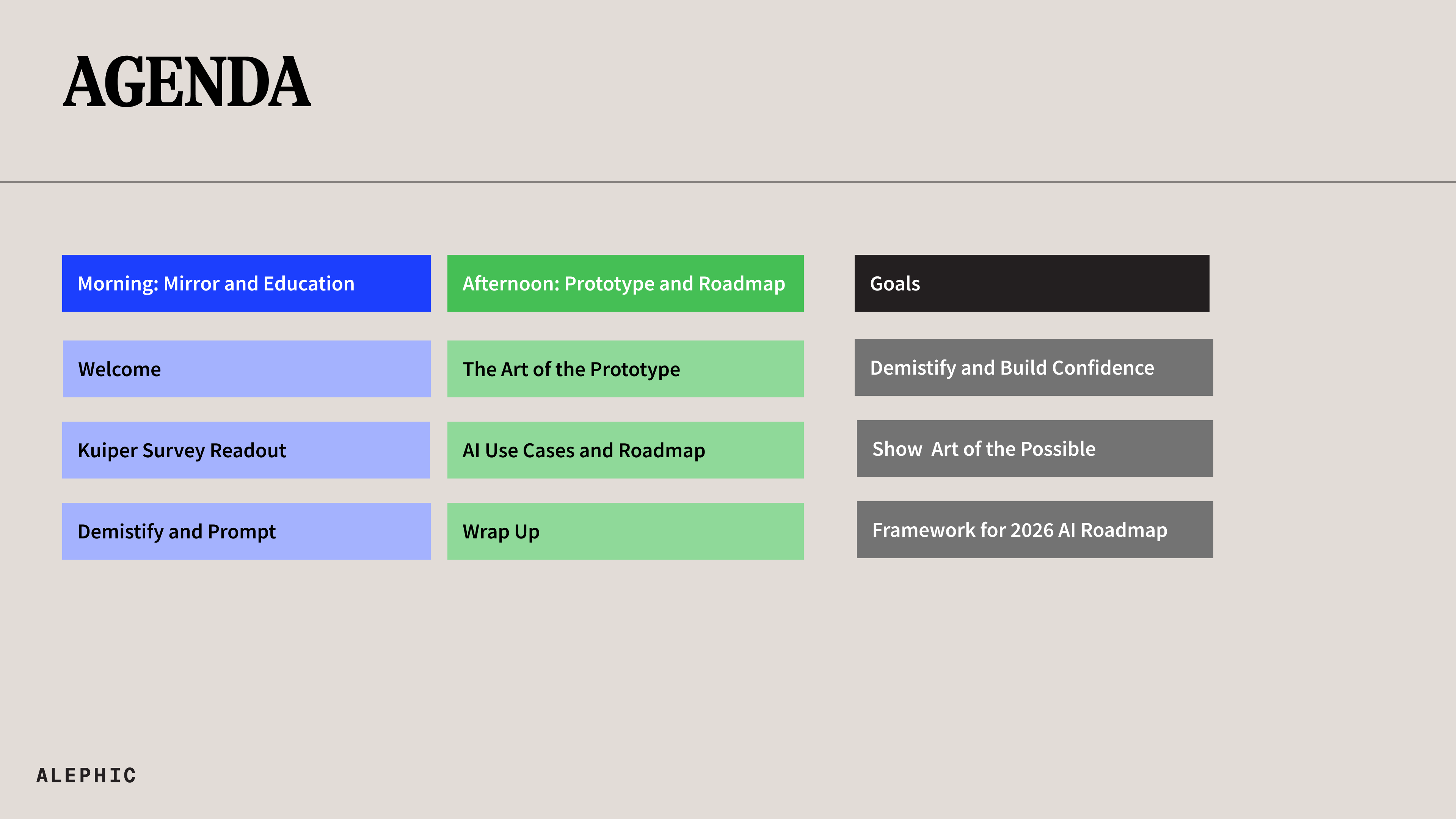
Morning: Mirror and Education
9:00-10:30 • AI Ah-Ha Intro & Kuiper Survey Readout
Presented by: James Gross
- • Build app around survey data
- • Showcase takeaways, allow for further "All your, not so, dumb questions"
- • Current Amazon Work Examples where needed
10:30-10:45 • Break
10:45-12:15 • Demystify and Excite AI Presentation
Presented by: Noah Brier
- • Why AI is weird and counterintuitive
- • Why bureaucracy is the substrate to AI
- • Prompting 101 → 201
12:15-1:00 • Lunch
Afternoon: Prototype and Roadmap
1:00-2:30 • Prototype
Presented by: Charles Gallant
- • The art of prototyping
- • Dissecting the problem
- • The build itself
- ◦ Feedback loops (what's possible vs. what's easy vs. what's valuable)
- • Testing / measuring success
- • The Kuiper Prototype
2:30-2:45 • Break
2:45-4:15 • AI Roadmap and Use Case Mapping
Presented by: Kat Gillis
- • Leverage use cases from survey data
- • Prioritize use cases on grid
- • Discuss other opportunities
- • Roadmap 2026 based on prioritization matrix
Workshop Goals
Demistify and Build Confidence
Help the team understand AI fundamentals and build confidence in working with AI tools
Show Art of the Possible
Demonstrate real-world applications and what can be achieved with AI
Framework for 2026 AI Roadmap
Create an actionable prioritization framework and roadmap for AI adoption in 2026